3

I was working on a tsql project, and I have noticed that the existing code used a syntax that I have not seen before. They have put a dollar sign in front of the database name for fully qualified address.

Here is one example :

SELECT  c.AccountCode, FROM **[$(SmartAdmin)]**.dbo.Customers c
enter image description here

If I rename the database name as SmartAdmin.dbo.Customers, Visual Studio throws error says "contains an unresolved reference to an object".

It appears to be a Visual Studio related thing, can anyone explain what is this and whether I can remove it.

Please see the attached screenshots, the last one comes from project solution file.
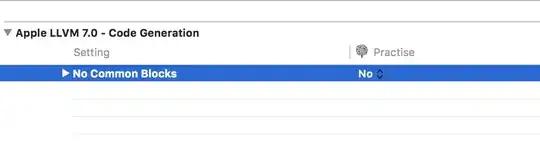
enter image description here

enter image description here

John Saunders
  • 160,644
  • 26
  • 247
  • 397
June
  • 974
  • 5
  • 20
  • 34
  • Seems [pretty boring](http://stackoverflow.com/q/3551284/11683) to me. – GSerg Dec 07 '14 at 22:20
  • Well, if I don't solve this issue, my database project will not build and I can't check in. So, it is not boring to me. Thanks – June Dec 07 '14 at 22:21
  • 2
    go to sql server and execute `Select * From sys.databases` and see if your database is actually called `$(SmartAdmin)`. – M.Ali Dec 07 '14 at 22:24
  • Hi M.Ali thank you very much for your comments. The database is called SmartAdmin, and in Visual Studio, I have always be able to call it using fully qualified name as [SmartAdmin].[dbo].[TableName] without any issue. – June Dec 07 '14 at 22:28
  • looks like the usual format for a parameter placeholder that would be substituted by code. – Mitch Wheat Dec 07 '14 at 22:28
  • Hi Mitch, thank you very much for your comments. I think it is to do with Visual Studio settings. Please see the attached screenshot. Regards. – June Dec 07 '14 at 22:32
  • so you have your answer. – Mitch Wheat Dec 07 '14 at 22:55
  • Not yet, modified solution file, still not working. – June Dec 07 '14 at 22:58
  • The `[$(SmartAdmin)]` is not the problem. The rest of the error message is the problem. Read what it says about ambiguous references. – John Saunders Dec 07 '14 at 23:10
  • This appears to be an SQL script with parameters intended for the [sqlcmd utility](http://dba.stackexchange.com/a/46258/5203), not to be directly executed from the studio. – GSerg Dec 07 '14 at 23:14
  • 1
    @GSerg - SSDT (visual studio) uses this for cross database references. It ought to resolve them itself if all set up correctly. – Martin Smith Dec 07 '14 at 23:16

3 Answers3

6

The [$(SmartAdmin)] syntax is used in an SSDT project to reference objects in other databases. To be precise, it is SQLCMD syntax.

If you have a database reference to SmartAdmin, and if the reference is set up so that [$(SmartAdmin)] properly references it, then that is not the problem. It looks like the problem is the other two references to [SmartAdmin]. Change them to look like [$(SmartAdmin)].dbo.whatever.


Example of why these references are useful: I just edited a stored procedure I had in SSDT to misspell a column name. Within seconds, the column name was underlined in red. I then deleted the database reference the column name depended on. The red underline went away. I added the database reference back, and the column was once again underlined in red. I corrected the column name, and the red underline went away.

Without the database reference, I would have had to wait until the stored procedure was deployed, or possibly executed, to see the error. With the database reference, I found out about the problem in the editor. Just like code.

John Saunders
  • 160,644
  • 26
  • 247
  • 397
  • Hi John, thank you very much for the solution ! Do you know where I should go in Visual Studio to change that reference. I would like to just call it as [SmartAdmin] instead of [$(SmartAdmin)]. Thank you. – June Dec 07 '14 at 23:46
  • You can't change it that way. The `[$()]` is syntax, not naming. If you don't switch those external references to the `[$(x)]` syntax, you will lose some of the best features in SSDT. For instance, SSDT won't know the data types of `sp.[PerSms]` and `spo.[PerSms]`, so it won't be able to warn you about inconsistent use of the `PerSms` column of the view. It's ugly, but once you get used to it, you'll see the benefits. Once you get the projects building, start turning on code analysis and you'll see problems you never imagined were there. – John Saunders Dec 08 '14 at 03:57
  • You can also change your database reference to NOT reference through a variable name. Edit the properties of your database reference to do that and then reference the way your normally would. – Peter Schott Dec 08 '14 at 17:07
  • @PeterSchott: how would you do this (edit the properties)? I don't see a way to accomplish that. And I just verified that if you don't use a DB reference, then SSDT will not notice errors in referencing the other DB. – John Saunders Dec 08 '14 at 17:50
  • See if this helps: http://schottsql.blogspot.com/2012/10/ssdt-external-database-references.html – Peter Schott Dec 08 '14 at 20:36
  • @PeterSchott that was interesting, but it didn't "work". Meaning with a blank variable name and referencing db as "SmartAdmin.", I can still use invalid column names. Please try this "negative test" and see what you see. I am using SQL Server 2008 and VS2013 Ultimate. – John Saunders Dec 08 '14 at 20:48
  • It sounds like you might have turned off that warning in your project - suppress warnings in the main project properties can do that. I don't think you'll get an error in those cases, but you should get a warning unless they've been suppressed. If you get warnings, you can set the project to treat warnings as errors for the purpose of builds. That may help a bit. --- I'd also recommend using DB References rather than counting on SSDT not seeing errors. – Peter Schott Dec 08 '14 at 22:18
  • @PeterSchott: which warning? I suppress warnings from unreferenced objects in the referenced project, but that shouldn't prevent SSDT from showing me warnings in the referencing project. In fact, I see those warnings when I use the database reference with the variable. This is why I use such references - I want to see the warnings. Your technique prevents warnings about the referencing project. In fact, I think your technique causes SSDT to not use the reference at all, at least, not in the editor. – John Saunders Dec 08 '14 at 22:38
  • Strange - when I use that method and try to reference a column that was added to a later version of the dacpac (i.e., not in the current dacpac), I get a warning about it. I'll most often get the warnings on build, but have seen them pop up in the editor as well. I'll do some more digging into what we're doing to see if I can repro or give better examples. – Peter Schott Dec 09 '14 at 05:16
  • Also, I have been using references to database projects in the same solution, if that matters at all. – John Saunders Dec 09 '14 at 11:42
0

It appears to me that your database is actually called $(SmartAdmin)

As the error suggests "contains an unresolved reference to an object". which means when you change the database name to SmartAdmin, it cannot find a database with this name on server.

If you want to change the database name you will need to execute the following statement and then you will be able to use that name in your statements.

USE master;
GO

EXEC sp_renamedb '$(SmartAdmin)', 'SmartAdmin';
GO

USE SmartAdmin;  --<-- Now you will be able to connect to this database
GO                 -- without the dollar ($) sign. 
M.Ali
  • 67,945
  • 13
  • 101
  • 127
  • Hi M.Ali. Thank you very much for your answer. However, the database is named SmartAdmin without $(). Regards, – June Dec 07 '14 at 22:35
0

This issue relates to Database Project External Database References. When you add another solution to a database project, you can specify the "Database Variable Name", in my case, it is $(SmartAdmin).

Please see this link for more information. enter image description here

Thanks everybody for answering my question.

June
  • 974
  • 5
  • 20
  • 34