You can only add a UICollectionViewCell inside a UICollectionView when working on a Storyboard file. For sure, you must be using a single nib file and that's why it isn't working.
If you wanna use a custom UICollectionViewCell, then you must create a subclass of UICollectionViewCell. When subclassing UICollectionViewCell don't forget to check the box that says "Also create XIB file" beneath the expandable menu of "Subclass of". Now, try to drag a UICollecionViewCell onto the canvas and custom it the way you want.
Another posibility would be using a Storyboard file. Try setting your UICollectionView inside a scene in the storyboard and then drag a UICollectionViewCell inside it. When dragged, create a UICollectionViewCell subclass and assign it to the UICollectionViewCell you dragged previously inside your CollectionView in the Identity inspector.
In either case, don't forget to set the reuse identifier of your UICollectionViewCell in the Attributes inspector :)
Here is a code sample from Apple of how to create a UICollectionView with a custom UICollectionViewCell using a storyboard.
https://developer.apple.com/library/ios/samplecode/CollectionView-Simple/Introduction/Intro.html#//apple_ref/doc/uid/DTS40012860
Hope this helps :-)
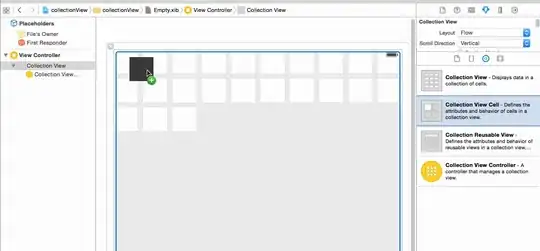 Am I doing anything wrong?

