OpenSCAD User Manual/Special Modules
Special Modules
- assert() Module
- halt execution if the given condition is not met
- echo() Module
- report the given arguments to the console, converting data structures to text
- let() Module
- to create temporary, local variables
assign() Module- [Deprecated: assign() will be removed in a future release. Use let() instead] to create temporary, local variables
- render() Module
- to resolve rendering issues in preview
assert()
[Note: Requires version 2019.05] see also Assertion (software development)
This is a syntactic element that may be used nearly anywhere in a script. It is not a function call, does not affect scope, and cannot have a child block using braces ( "{}" ).
Assert evaluates the condition which should normally be an expression giving a Boolean result.
When the result is false, the script halts and emits an error message to the console.
The default report is a string showing the expression and line number.
If the second argument is given it is appended to the message.
 assert(condition)
 assert(condition, message)
Note that the appearance of assert() does not, by itself, form a statement and so no semi-colon (";") is needed to terminate it Parameters
- condition
- the expression given will be resolved to a Boolean true/false, if necessary using the rules for converting non-boolean values.
- message
- String to be appended to the message emitted when the assertion fails.
Examples
A call to assert(false); will halt the running script.
assert(false)
Emitting this message on the console
ERROR: Assertion 'false' failed in file assert_example1.scad, line 2
Checking Parameters
// Row must draw at least 3 spheres
module row(qty) {
    assert(qty>= 3) // NOT the end of a statement
    for (i = [1 : qty])
        translate([i * 2, 0, 0]) sphere();
    }
row(0);
// ERROR: Assertion '(qty > 0)' failed in file assert_example2.scad, line 3
In cases like this using the added message can show the user how the module is intended to be used. If the assert() could be changed to:
assert(qty > 0, "Quantity must be at least 3.");
the output is more useful:
// ERROR: Assertion '(qty>=0)': "Quantity must be at least 3./" failed in file assert_example3.scad, line 2
The qty parameter can be a floating value, but by its use in the for-loop it probably should not be.
The assertion can be expanded:
assert( is_num(qty) && qty >=3 )
to tighten the requirements on the input parameter
Checking Function Parameters Functions are limited to a single expression that returns a value. It is not possible to use additional if-the-else statements to test a function's given inputs but a nested ?: conditional statement avoids that restriction:
// set all letters to "lower case"
function lower(string) =
	is_not_string( string ) ?
		undef
	: str_is_empty( string ) ?
		""
	: str_lower( string )
	;
This method has the advantage that bad inputs do not halt execution, but some may prefer a stricter enforcement of a function's interface, thusly:
// set all letters to "lower case"
function lower(string) =
	assert( ! is_string( string ) )
	assert( string != "" )
	str_lower( string ) // does the work
	; // end of the function definition staement
If the lower() function is called with improper inputs the user will get immediate feedback.
Testing Features
To test a function that accumulates the values of an array we can set up test conditions that we know have to be correct
if(_NUMTEST_ENABLED) {
echo( "\ttesting cumsum_vec()" );
	csv = [1,3,7,1];
	vec=[ 10, 20, 30, 40 ];
	echo( cs=cumsum_vec( csv ));
	echo( cs=cumsum_vec( vec ));
	}
assert( cumsum_vec( [1,3,7,1] ) == 12 );
assert( cumsum_vec( [10, 20, 30, 40] ) == 100 );
Echo
A call to echo() prints its given arguments to the compilation window (aka Console).
Any number of arguments of any type may be given, including function calls and other expressions.
Each given argument is separated by a comma and a space.
Strings are displayed in double quotes ('"'), vectors by square brackets ("[]"), and objects inside braces ("{}").
The String Function str() may be used to prepackage a number of values into a string so that values will NOT be separated by a blank. Str() also does not add quotes around strings and does not separate elements with ", ".
Numeric values are rounded off to 5 significant digits. This means that fractions smaller than 0.000001 are not displayed and that very large values are shown in scientific notation with only the first 6 digits shown.
Arguments to Echo() may be given individual labels by using the form: 'variable=variable' as will be seem in this example.
Usage examples:
 my_h=50;
 my_r=100;
 echo("a cylinder with height : ", my_h, " and radius : ", my_r);
 echo( high=my_h, rad=my_r); // will display as high=<num> rad=<num>
 cylinder(h=my_h, r=my_r);
small Decimal Fractions are Rounded Off
This example shows that the fractional part of 'b' may appear to be rounded off when printed by echo(), but is still present for use in calculations and logical comparisons:
a=1.0;
b=1.000002;
echo(a); // shows as '1'
echo(b); // also shows as '1'

if(a==b){
    echo ("a==b");
}else if(a>b){
    echo ("a>b");
}else if(a<b){
    echo ("a<b"); // will be the result
}else{
    echo ("???");
}
Shows in the Console as
ECHO: 1
ECHO: 1
ECHO: "a<b"
Very Small and Large Numbers
Echo shows very small decimal fractions, and very large values, in C Language style scientific notation.
c=1000002;
d=0.000002;
echo(c); //1e+06
echo(d); //2e-06
The syntax of values shown in this form is described in the section on [[1]]
Formatting Output
The only control over text output by echo() is the use of '\n', '\t', and '\r' characters. These are, of course, the Escape Characters for Newline, Tab, and Return and they may be used as part of a string to, respectively, begin a new line, insert blanks to the next tab stop (every 4 spaces), and return to the beginning of the line.
HTML output is not supported in development versions, starting 2025.
Echo in an Expression
[Note: Requires version 2019.05]
A call to Echo() can be made as part of an expression to print information to the console just before the expression is evaluated. This means that in when the expression includes a recursive call to a function or module that echo's arguments are shown before the recursion. To be able to see values after the expression one may use a helper function as will be shown by "result()" in the second example following.
Example
 a = 3; b = 5;
 // echo() prints values before evaluating the expression
 r1 = echo(a, b) a * b; // ECHO: 3, 5

 // like a let(), a call to echo() may be included as part of an expression
 r2 = let(r = 2 * a * b) echo(r) r; // ECHO: 30

 // use echo statement for showing results
 echo(r1, r2); // ECHO: 15, 30
A more complex example shows how echo() can be used in both the descending and ascending paths of a recursive function.
Example printing both input values and result of recursive sum()
 v = [4, 7, 9, 12];
 function result(x) = echo(result = x) x;
 function sum(x, i = 0) = echo(str("x[", i, "]=", x[i])) result(len(x) > i ? x[i] + sum(x, i + 1) : 0);
 echo("sum(v) = ", sum(v));

 // ECHO: "x[0]=4"
 // ECHO: "x[1]=7"
 // ECHO: "x[2]=9"
 // ECHO: "x[3]=12"
 // ECHO: "x[4]=undef"
 // ECHO: result = 0
 // ECHO: result = 12
 // ECHO: result = 21
 // ECHO: result = 28
 // ECHO: result = 32
 // ECHO: "sum(v) = ", 32
let()
Sequential assignments, separated by commas, can create temporary variables that will only be visible in the following expression. The later assignments can use variables created by assignments coming before them. The following expression is evaluated in context using all the variables created by the let() operation. Using the let to break a complicated expression into more readable parts is good for internal documentation and makes intermediate values available for reporting using echo().
let() In An Expression
let() In An Vector Comprehension
Render Operator
Causes meshes to be generated for surfaces in preview mode. This improves the rendered images when the normal preview renderer produces artifacts or misses parts of the image around complex bits of geometry. An issue on GitHub discusses some of these issues, and an FAQ covers more: OpenSCAD User Manual/FAQ#Why are some parts (e.g. holes) of the model not rendered correctly?
- function definition
- render( convexity = 1 )
- convexity
- an indication to the preview renderer that objects in view are not simple. See the section on the Convexity Parameter
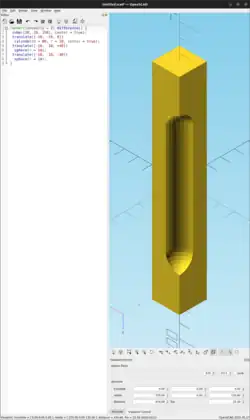
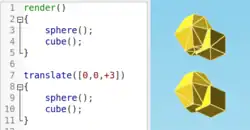
Usage examples:
 render( convexity = 2 )
    difference()
        { // stretch a cube vertically
        cube([20, 20, 150], center = true);
        // make a notch in one corner
        translate([-10, -10, 0])
            cylinder(h = 80, r = 10, center = true);
        translate([-10, -10, +40])
            sphere(r = 10);
        translate([-10, -10, -40])
            sphere(r = 10);
        }