OpenSCAD User Manual/Text
Text in OpenSCAD
Being able to use text objects as a part of a model is valuable in a lot of design solutions. The text() module is used to draw a string of text as a set of 2D shapes according to the specifications of the given font. The fonts available to use in a script are from the system that OpenSCAD is running in with the addition of those explicitly added by the script itself. To be able to format text, or to align text in relation to other shapes, a script needs information about the text objects that the script is working on, and also about the structure and dimensions of the fonts in use.
text() Object Module
The text() object module draws a single string of text as a 2D geometric object, using fonts installed on the local system or provided as separate font file.
The shape starts at the origin and is drawn along the positive X axis.
Vertical alignment, as set by the valign parameter, is relative to the X axis, and horizontal alignment ( halign ) to the Y axis
[Note: Requires version 2015.03]
Parameters
- text
- String. A single line of any character allowed. Limitation: non-printable ASCII characters like newline and tab rendered as placeholders
- font
- a formatted string with default font of "Liberation Sans:style=Regular"
- size
- non-negative decimal, default=10. The generated text has a height above the baseline of approximately this value, varying for different fonts but typically being slightly smaller.
- halign
- String, default="left". The horizontal alignment for the text. Possible values are "left", "center" and "right".
- valign
- String, default="baseline". The vertical alignment for the text. Possible values are "top", "center", "baseline" and "bottom".
- spacing
- float, default=1. Multiplicative factor that increases or decreases spacing between characters.
- direction
- String, default="ltr". Direction of text. Possible values are "ltr" (left-to-right), "rtl" (right-to-left), "ttb" (top-to-bottom) and "btt" (bottom-to-top).
- language
- String. The language of the text (e.g., "en", "ar", "ch"). Default is "en".
- script
- String, default="latin". The script of the text (e.g. "latin", "arabic", "hani").
- $fn
- higher values generate smoother curves (refer to Special Variables)
Example
_example.png)
text("OpenSCAD");
Font & Style Parameter
The "name" of a font is a string starting with its logical font name and variation, optionally followed by a colon (":") separated list of font specifications like a style selection, and a set of zero or more features.
The common variations in a font family are sans and serif though many others will be seen in the list of fonts available.
Each font variation can be drawn with a style to support textual emphasis.
The default, upright appearance is usually called "Regular" with "Bold", "Italic", and "Bold Italic" being the other three styles commonly included in a font. In general the styles offered by a font may only be known by using the platform's font configuration tools or the OpenSCAD font list dialog.
_font_features_example.png)
In addition to the main font variations, some fonts support features for showing other glyphs like "small-caps" (smcp) where the lower case letters look like scaled down upper case letters, or "old-numbers" (onum) where the numbers are designed in varying heights instead of the way modern lining draws numbers the same size as upper case letters.
The fontfeatures property is appended to the font name after the optional style parameter.
Its value is a semi-colon separated list of feature codes, each prefixed by a plus, "+", to indicate that it is being added,
font = "Linux Libertine G:style=Regular:fontfeatures=+smcp;+onum");
Basic Font Parameter Example
_font_style_example.png)
 square(10);

 translate([15, 15]) {
   text("OpenSCAD", font = "Liberation Sans");
 }

 translate([15, 0]) {
   text("OpenSCAD", font = "Liberation Sans:style=Bold Italic");
 }
Size Parameter
Text size is normally given in points, and a point is 1/72 of an inch high.
The formula to convert the size value to "points" is pt = size/3.937, so a size argument of 3.05 is about 12 points.
Note: Character size the distance from ascent to descent, not from ascent to baseline.
Vertical Alignment
One of these four names must be given as a string to the valign parameter.
- top
- The text is aligned so the top of the tallest character in your text is at the given Y coordinate.
- center
- The text is aligned with the center of the bounding box at the given Y coordinate. This bounding box is based on the actual sizes of the letters, so taller letters and descending below the baseline will affect the positioning.
- baseline
- The text is aligned with the font baseline at the given Y coordinate. This is the default, and is the only option that makes different pieces of text align vertically, as if they were written on lined paper, regardless of character heights and descenders.
- bottom
- The text is aligned so the bottom of the lowest-reaching character in your text is at the given Y coordinate.
Note: only the "baseline" vertical alignment option will ensure correct alignment of texts that use mix of fonts and sizes.
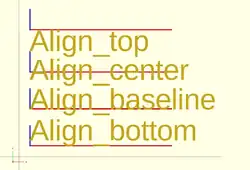
 text = "Align";
 font = "Liberation Sans";

 valign = [
   [  0, "top"],
   [ 40, "center"],
   [ 75, "baseline"],
   [110, "bottom"]
 ];

 for (a = valign) {
   translate([10, 120 - a[0], 0]) {
     color("red") cube([135, 1, 0.1]);
     color("blue") cube([1, 20, 0.1]);
     linear_extrude(height = 0.5) {
       text(text = str(text,"_",a[1]), font = font, size = 20, valign = a[1]);
     }
   }
 }
Horizontal Alignment
One of these three names must be given as a string to the halign parameter.
- left
- The text is aligned with the left side of the bounding box at the given X coordinate.
- center
- The text is aligned with the center of the bounding box at the given X coordinate.
- right
- The text is aligned with the right of the bounding box at the given X coordinate.
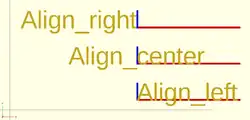
 text = "Align";
 font = "Liberation Sans";

 halign = [
   [10, "left"],
   [50, "center"],
   [90, "right"]
 ];

 for (a = halign) {
   translate([140, a[0], 0]) {
     color("red") cube([115, 2,0.1]);
     color("blue") cube([2, 20,0.1]);
     linear_extrude(height = 0.5) {
       text(text = str(text,"_",a[1]), font = font, size = 20, halign = a[1]);
     }
   }
 }
Spacing Parameter
Characters in a text element have the size dictated by their glyph in the font being used.
As such their size in X and Y is fixed.
Each glyph also has fixed advance values (it is a vector [a,b], see textmetrics) for the offset to the origin of the next character.
The position of each following character is the advance.x value multiplied by the space value.
Obviously letters in the string can be stretched out when the factor is greater than 1, and can be made to overlap when space is a fraction closer to zero, but interestingly, using a negative value spaces each letter in the opposite of the direction parameter.
Text Examples
Simulating Formatted Text
When text needs to be drawn as if it was formatted it is possible to use translate() to space lines of text vertically.
Fonts that descend below the baseline need to be spaced apart vertically by about 1.4*size to not overlap.
Some word processing programs use a more generous spacing of 1.6*size for "single spacing" and double spacing can use 3.2*size.
Fonts in OpenSCAD
The fonts available for use in a script are thosed:
- registered in the local system
- included in the OpenSCAD installation
- imported at run-time by a program
A call to fontmetrics() using only default settings shows the installation's standard font and settings:
echo( fontmetrics() );
gives this output (formatted for readability)
{
nominal = {
  ascent = 12.5733;
  descent = -2.9433;
  };
max = {
  ascent = 13.6109; descent = -4.2114;
  };
interline = 15.9709;
font = {
  family = "Liberation Sans";
  style = "Regular";
  };
}
In general the styles offered by a font may only be known by using the platform's font configuration tools or the OpenSCAD font list dialog.
The menu item Help > Font List shows the list of available fonts and the styles included in each one.
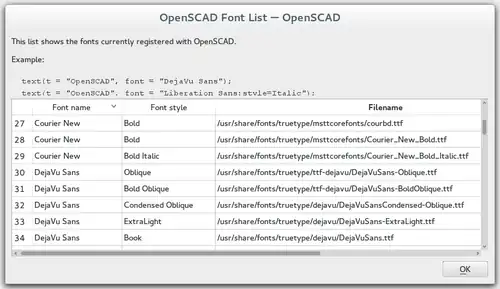
None of the platforms OpenSCAD is available on include the Liberation font family so having it as part of the app's installation, and making it the default font, avoids problems of font availability. There are three variations in the family, Mono, Sans, and Serif.
Note: It was previously noted in the docs that fonts may be added to the installation by drag-and-drop of a font file into the editor window, but as of version 2025 Snapshot this is not the case
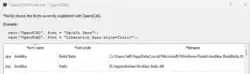
In the following sample code a True Type Font, Andika, has been added to the system fonts using its Font Management service.
It is also possible to add fonts to a particular project by importing them with the use statement in this form:
text( "sample", font="Andika:style=bold" ); // installed in system fonts

use <Andika-Italic.ttf>;

translate( [0,-10, 0] )
    color("green")
        text( "test", font="Andika:style=italic");
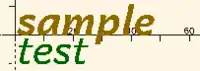
Supported font file formats are TrueType fonts (*.ttf) and OpenType fonts (*.otf). Once a file is registered to the project the details of the fonts in it may be seen in the font list dialog (see image) so that the logical font names, variations, and their available styles are available for use in the project.
3D Text by Extrusion
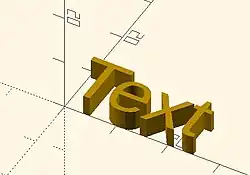
Text can be changed from a 2 dimensional object into a 3D object by using the linear_extrude function.
//3d Text Example
linear_extrude(4)
    text("Text");
Metrics
[Note: Requires version Development snapshot]
textmetrics() Function
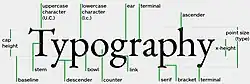
The textmetrics() function accepts the same parameters as text(), and returns an object describing how the text would be rendered.
The returned object has these members:
- position
- a vector [X,Y], the origin of the first glyph, thus the lower-left corner of the drawn text.
- size
- a vector [a,b], the size of the generated text.

measurements of a glyph - ascent
- positive float, the amount that the text extends above the baseline.
- descent
- negative float, the amount that the text extends below the baseline.
- offset
- a vector default [0, 0], the lower-left corner of the box containing the text, including inter-glyph spacing before the first glyph.
- advance
- a vector default [153.09, 0], amount of space to leave to any following text.
This example displays the text metrics for the default font used by OpenSCAD:
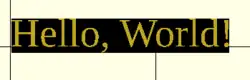
s = "Hello, World!";
size = 20;
font = "Liberation Serif";

tm = textmetrics(s, size=size, font=font);
echo(tm);
translate([0,0,1])
    text("Hello, World!", size=size, font=font);
color("black") translate(tm.position)
    square(tm.size); // "size" is of the bounding box
displays (formatted for readability):
ECHO: {
   position = [0.7936, -4.2752];
   size = [149.306, 23.552];
   ascent = 19.2768;
   descent = -4.2752;
   offset = [0, 0];
   advance = [153.09, 0];
   }
fontmetrics() Function
The fontmetrics() function accepts a font size and a font name, both optional, and returns an object describing global characteristics of the font.
Parameters
- size
- Decimal, optional. The size of the font, as described above for
text().
- font
- String, optional. The name of the font, as described above for
text().
Note that omitting the size and/or font may be useful to get information about the default font.
Returns an object:
- nominal: usual dimensions for a glyph:
- ascent: height above the baseline
- descent: depth below the baseline
- max: maximum dimensions for a glyph:
- ascent: height above the baseline
- descent: depth below the baseline
- interline: design distance from one baseline to the next
- font: identification information about the font:
- family: the font family name
- style: the style (Regular, Italic, et cetera)
echo(fontmetrics(font="Liberation Serif"));
yields (reformatted for readability):
   ECHO: {
       nominal = {
           ascent = 12.3766;
           descent = -3.0043;
       };
       max = {
           ascent = 13.6312;
           descent = -4.2114;
       };
       interline = 15.9709;
       font = {
           family = "Liberation Serif";
           style = "Regular";
       };
   }